An electronics curriculum for your class, with you in control
Video lessons, quizzes and guided hands-on builds for a whole school year. You choose what your students can open and follow each student's progress. Students get their own accounts, and see only what you've opened.
Homeschooling? See Ohmify for Homeschool.
A curriculum, ready to teach
Structured courses from the first LED to transistors, digital logic, Arduino and circuit boards. No textbook needed.
You decide what students see
Open whole courses, or just the lessons that match this week's unit. Everything else stays closed.
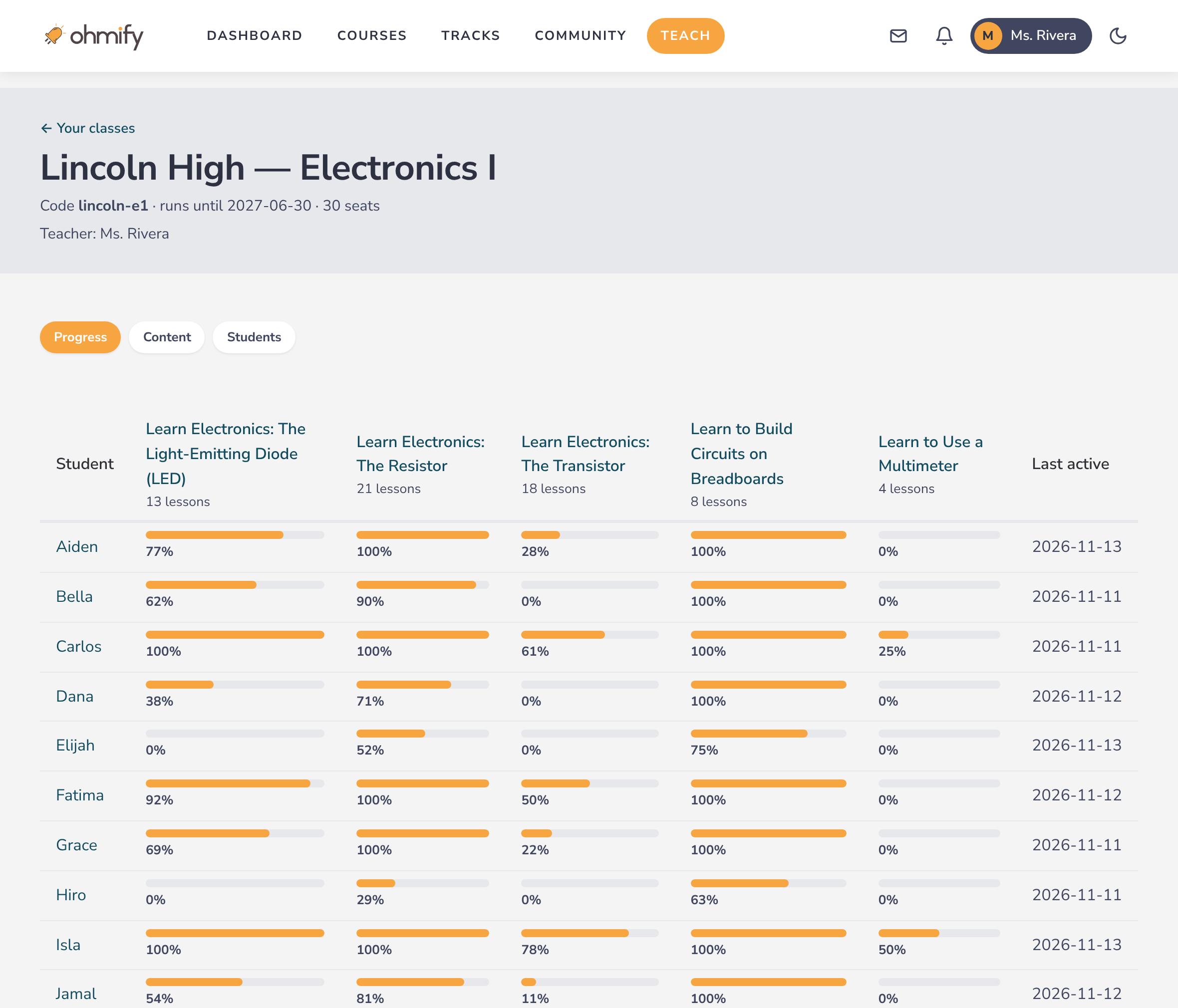
Every student's progress
One table shows how far each student has come in each course, and when they were last active.
Made for classrooms
Students have no access to the community, messages or profiles. Their accounts don't need an email address.
What you get as a teacher
- Every course on Ohmify. Full access to the whole library (100+ courses and projects), including what we add during the year, so you can try a course before you open it for the class.
- The teacher dashboard. Create student accounts, choose the class's content and follow progress, from one place.
- The Ohmify community. Ask our tutors and other builders when a circuit doesn't work or you're preparing a lesson.
- Direct support. We set up your class with you, and answer by email when you need us.
- Room for colleagues. A class can have several teachers, with the same rights in it.
- Several classes. One class per group of students, each with its own content and progress.
How teachers use it
Assign the lessons that match your current unit. Students watch a short lesson, then build the circuit on a breadboard in class while you help and assess.
Ohmify is the structured part: explanations, quizzes and step-by-step builds. The lab work stays yours.
The teacher dashboard
Follow progress
A row per student and a column per course you've opened. Click a student to see which lessons they've completed.
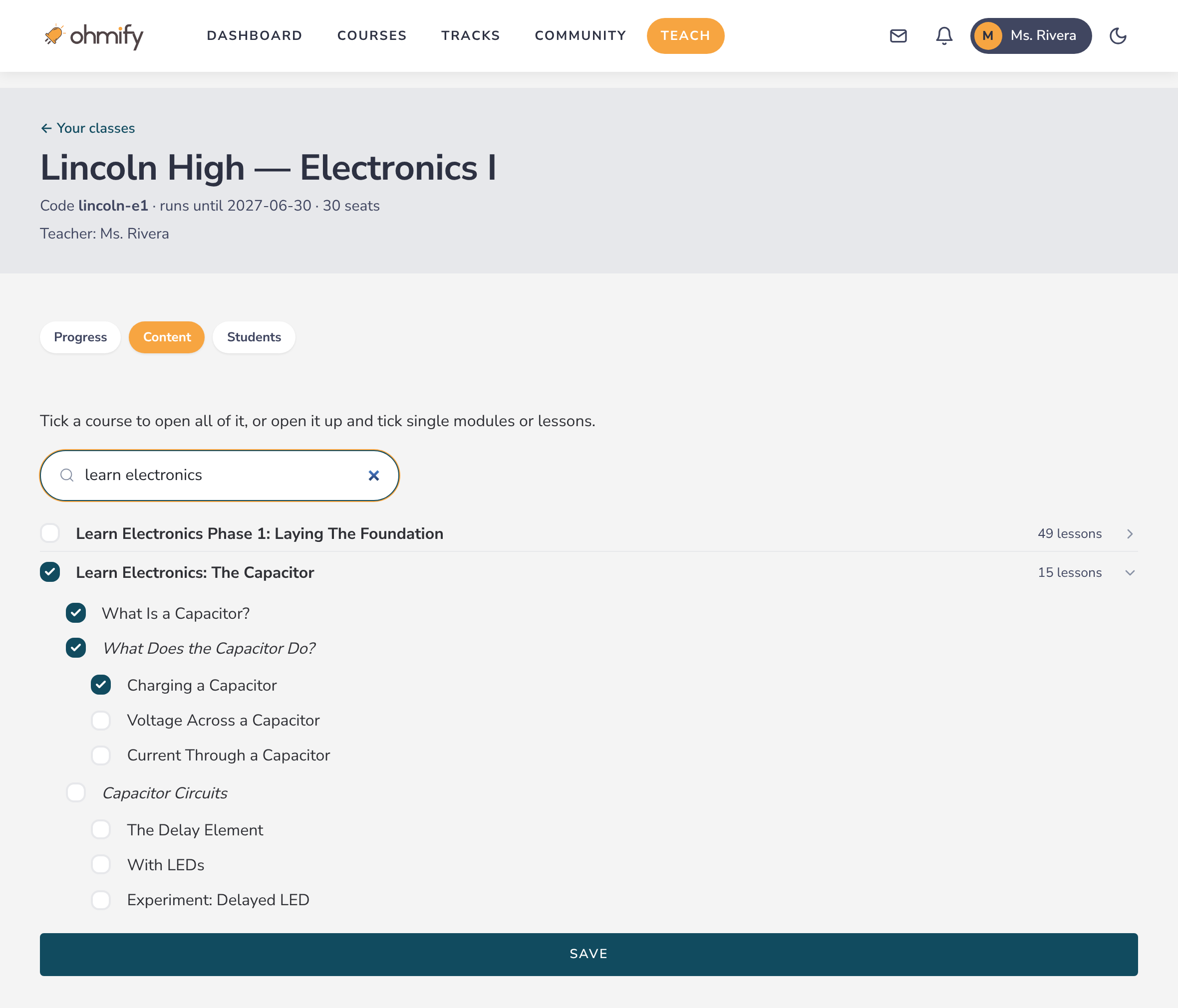
Choose the content
Tick a course to open all of it, or open it up and tick single modules or lessons. Change it whenever you like: students see the change right away.
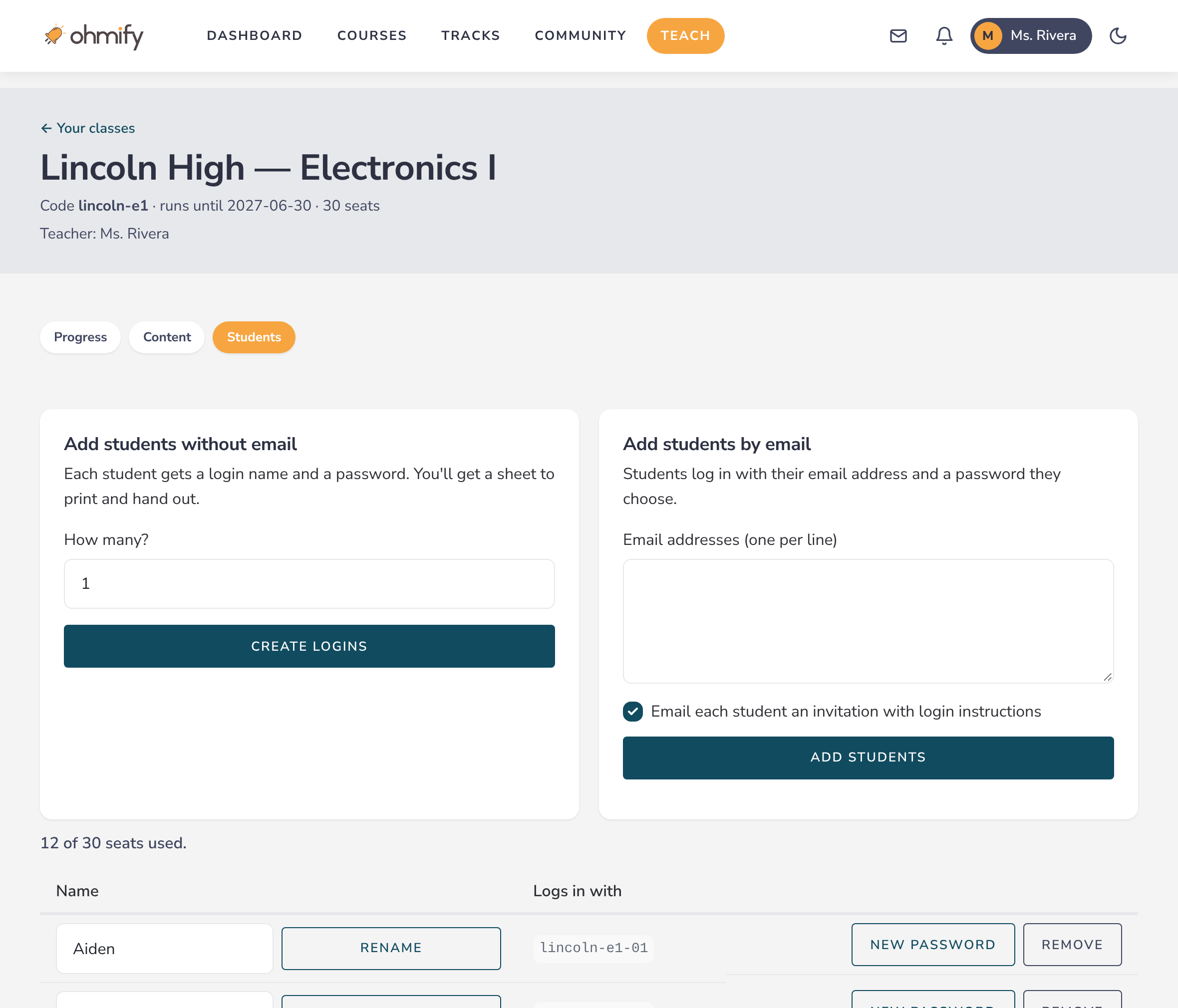
Create student accounts
Enter how many students you have and print a sheet of login names and passwords, or paste a list of school email addresses. Rename a student, give out a new password or remove an account yourself.
What your students get
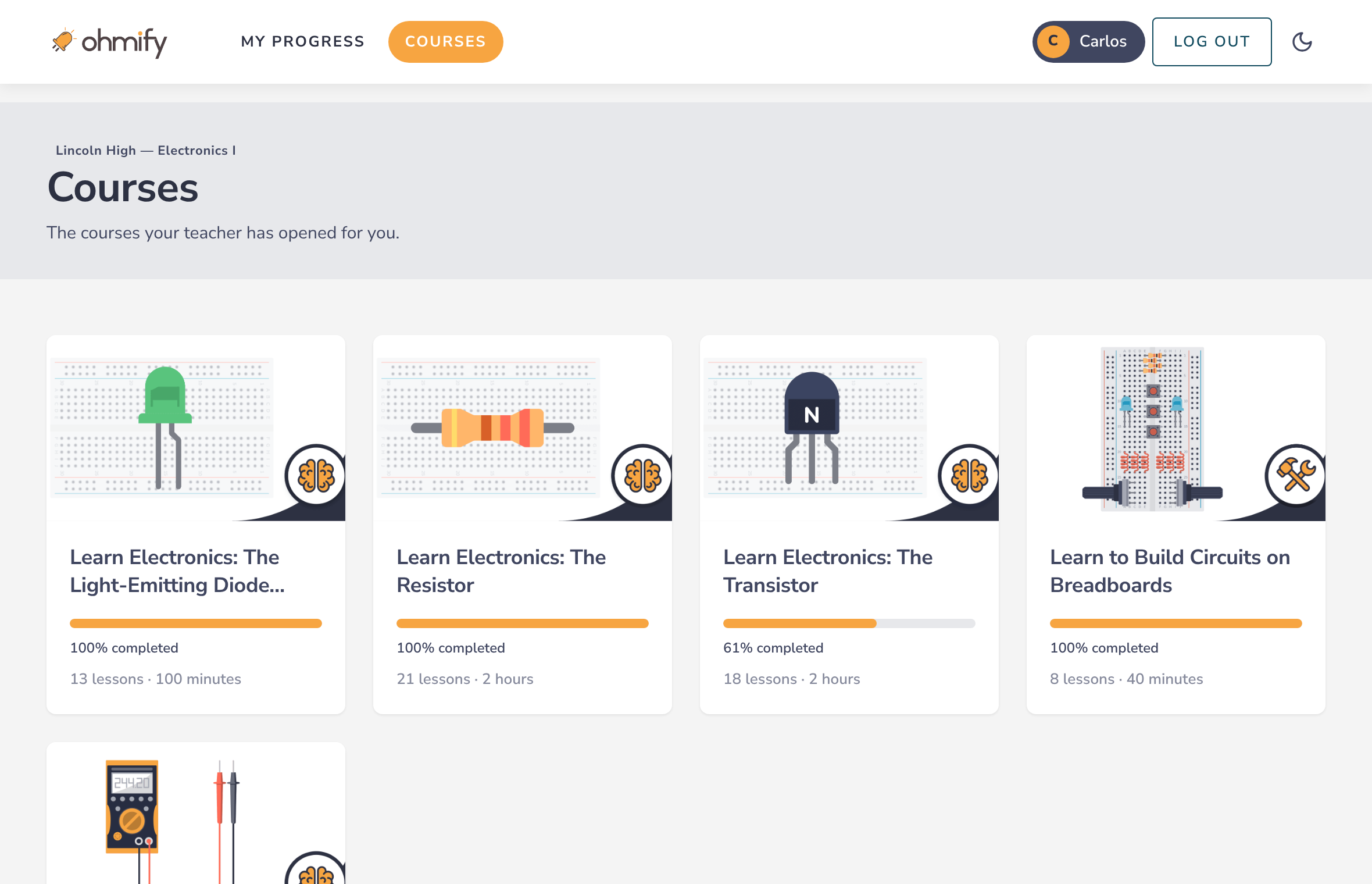
- Only what you've opened. Their Courses page lists your class's courses, nothing else.
- Their own progress. Each student sees what they've done and continues where they stopped.
- Lessons, quizzes and builds. The same courses our members take.
And what they don't
- No community: no forum, no messages, no public profile.
- No emails from Ohmify, unless you choose to send invitations.
- No other courses, and nothing to buy.
Three ways to log in
No email at all
Ohmify makes login names like 7b-oak-01 with passwords, on a sheet you print and hand out. We store no personal information: you decide the name shown for each student.
School email
One account per address. Students choose their own password. Whether they get an invitation email is up to you.
Sign in with Google
Students with school Google accounts log in with the Google button. We ask Google only for their name and email address.
What students learn
Beginner-friendly courses where students build real circuits. Enough for a full school year, and you pick the parts that fit your course.
- Breadboards and schematics
- Resistors, capacitors and LEDs
- Transistors and diodes
- Integrated circuits and the 555 timer
- Digital electronics and logic gates
- Op-amps
- Arduino and microcontrollers
- Internet of Things
- Multimeters and oscilloscopes
- Soldering
- Circuit board (PCB) design
- Repair and circuit analysis
For your school's office
Student privacy
- Student accounts can be anonymous: a login name and a password, no email address and no real name.
- Ohmify AS is a Norwegian company and follows the GDPR.
- Need a data privacy agreement (DPA)? We'll complete your district's, or provide one.
- When a class ends, its student accounts can no longer log in. They are deleted a year later.
Buying
- Priced for a school year, by the number of student and teacher accounts you need.
- A written quote to pass on for approval.
- Pay by invoice or purchase order. We'll register as a vendor with your district if that's needed.
- Approval and payment can take weeks. Once your school says yes, your class can start.
How to get started
- Book a demo or request a quote. We'll show you the dashboard and answer your school's questions.
- We set up your class. You get your teacher accounts and a class with the student accounts you asked for.
- Add students and choose content. It takes a few minutes.
- Teach. Students log in and start; you follow their progress.
Questions teachers ask
Does Ohmify include circuit simulation software?
No. Ohmify has video lessons, quizzes and guided hands-on builds: students learn by building real circuits.
What equipment do we need?
Breadboards and common components such as resistors, LEDs, capacitors and transistors, and an Arduino for the microcontroller courses. Most electronics classrooms have much of it already. Tell us what you'd like to teach and we'll help you work out what's needed.
Can my students use their school Google accounts?
Yes. Add their addresses to the class and they log in with the Google button. For students under 18, Google Workspace for Education may block the login until your school's Google admin allows Ohmify; we'll send the steps. Until then, students can log in with a password.
Do students need an email address?
No. You can create accounts with login names and passwords only.
Can I open single lessons instead of whole courses?
Yes: whole courses, modules, or single lessons.
Can my supervisor or IT team join the demo?
Yes, please invite them. It's the easiest way to get their questions answered.
What happens when the school year ends?
Student accounts and their progress are kept for a year, in case the class continues, and then deleted.
See it with your own class in mind
Book a demo and we'll walk you through the teacher dashboard and what your students would see. Or ask for a quote to pass on for approval.